

Graphic Assets
Approved Elephant

Tuska

.EPS Format
Denny Chimes
Full Denny Chimes

.EPS Format
PNG Format
Cropped Denny Chimes

.EPS Format
PNG Format
Legends Branding



Rising Tide 2.0 Capital Campaign Assets
Official fonts and colors for the Rising Tide 2.0 Capital Campaign are:
Fonts (all from the Adobe Fonts library)
- Headlines – Mr. Eaves Modern – Heavy
- Taglines, contrast zones (all caps) – Bree Serif – light or regular, depending on need of contrast or hierarchy of information
- Additional contrast (italic) – Soleil – light
Colors
PMS 201
PMS 432
Email Signature
To create an email signature for the Rising Tide 2.0 Capital Campaign, please visit this signature page.
Rising Tide 2.0 Campaign Mark – Horizontal


PMS 201


Rising Tide 2.0 Campaign Mark – Circular

Rising Tide Campaign Mark – Icon
Black

White


Wave Icon

Design Templates
The following design templates are provided to assist with creating properly branded and effective publications that meet University of Alabama brand standards. Please use them as intended.
All ad and brochure downloadable packages are in .zip format. The templates are in Adobe InDesign format and include all required images, fonts and resources.
If you are missing fonts used in these templates, you may purchase fully-licensed Open Type fonts at http://www.fonts.com or http://www.adobe.com/type/.
Brochure Templates
PowerPoint Templates
Legends PowerPoint Template – Wide
PowerPoint Template – Option 1
PowerPoint Template – Option 1 – Wide
PowerPoint Template – Option 2
PowerPoint Template – Option 2 – Wide
PowerPoint Template – Option 3
PowerPoint Template – Option 3 – Wide
PowerPoint Template – Option 4
PowerPoint Template – Option 4 – Wide
To change the department identifier/logo on the PowerPoint templates, right click on the current identifier in the template. Click on Change Picture > From File. Select the correct identifier. Save once new identifier is in place. A video tutorial can be found at: https://alabama.box.com/s/w1v545pcd7owfqzlz0czndp3dxd5465e
Research Solicitation Flyers
Research Flyer 1 (w/photo & contact tabs on right): Preview | Download
Research Flyer 1b (w/photo & no contact tabs): Preview | Download
Research Flyer 2 (w/photo & no contact tabs): Preview | Download
Research Flyer 2b (w/photo & contact tabs on right): Preview | Download
Research Flyer 3 (w/photo & contact tabs on bottom): Preview | Download
Research Flyer 3b (w/photo & no contact tabs): Preview | Download
Research Flyer 4 (w/no photo & no contact tabs): Preview | Download
Research Flyer 4b (w/photo & no contact tabs): Preview | Download
Research Flyer 4c (w/no photo & contact tabs on bottom): Preview | Download
While UA logos are locked in place, the text/photos can be edited or deleted in each flyer. If you open the file and it shows as Read Only, go to the top left of your Word screen, click VIEW and click EDIT DOCUMENT.
UA Video Footage
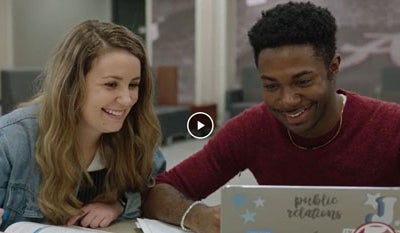
The following video footage is available for University of Alabama units to utilize in promotion of UA colleges, schools and programs. The Division of Strategic Communications will continue to add general downloadable footage to this site. When you click on the links below, you will be taken to UA Box and will have access to individual video folders with your MyBama login.

Photos
For a full library of downloadable photos, please visit: https://uaphotos.photoshelter.com. The following includes commonly requested photos for quick download for use in promotion of UA colleges, schools and programs. When you click on the links below, you will be taken to UA Box and will have access to individual photo folders with your MyBama login. NOTE: If you like a certain photo in these folders but would prefer a different orientation or to see if there are additional similar photos, type the first set of numbers before the underscore in the file name into the search feature at https://uaphotos.photoshelter.com.


Carnegie Dartlet Videos
Please note: These videos contain proprietary information and should not be shared outside of the UA community.
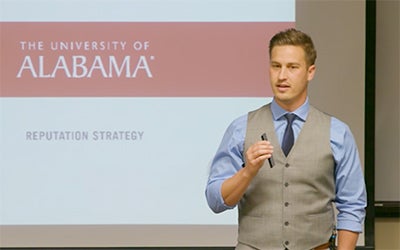
UA Reputation Strategy
In 2017, Carnegie Dartlet revealed the results of the UA workshops and quantitative research and unveiled The University of Alabama’s authentic personality and story. You can view the full presentation of UA’s reputation strategy by logging in to UA Box.
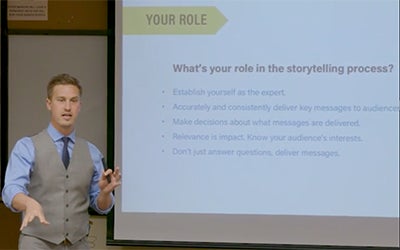
UA Training Workshop
In 2017, Carnegie Dartlet spent several days on campus training UA creative staff on how to apply UA’s authentic personality and story across University messaging. They reviewed key messaging techniques as well as best practices for web, print, photography and design. You can view this training session by logging in to UA Box.
Websites
Contacts
205-348-5768
205-348-5320
205-348-5767
205-348-3485
205-348-0853
205-348-2440
205-348-1841
205-348-9691
205-348-5200